
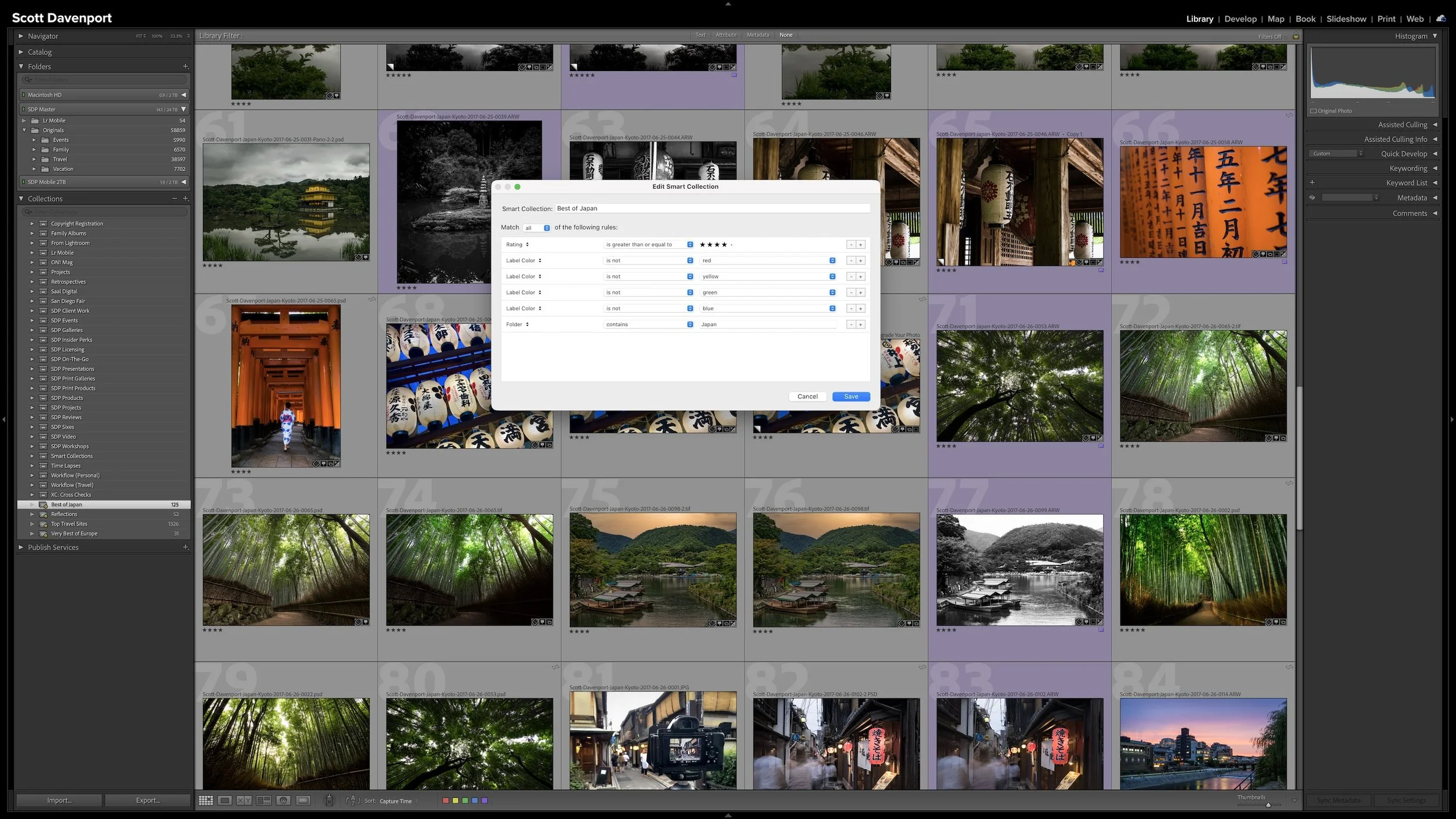
In Article 05 — Lightroom Folders and Collections Solve Different Problems, I used a Best of Japan Collection as an example. Rather than recreate my Japan folder as a Collection, I could make a Collection containing only the photographs I consider my best work from Japan.
With a regular Collection, I would choose those photographs myself.
However, suppose I can describe what qualifies a photograph for that group. Maybe it needs to come from my Japan work, have a certain star rating, and satisfy some other criteria I've already captured in Lightroom Classic.
Instead of finding and adding each photograph myself, I can give Lightroom those criteria and let it find the photographs for me.
That's the idea behind a Smart Collection.
Smart Collections Replace Selection With Rules
With a regular Collection, you look through the photographs and decide which ones to add.
A Smart Collection changes the question. Instead of choosing individual photographs, you define rules that describe the photographs Lightroom should gather.
Those rules can use information Lightroom already knows about the photographs. That might include ratings, keywords, location information, filenames, folders, camera information, exposure settings, and other metadata stored in the catalog.
If a photograph satisfies the rules, Lightroom can include it in the Smart Collection.
A Smart Collection uses rules to describe which photographs Lightroom should gather for you.
The photographs can come from anywhere in the catalog. Their original files remain exactly where they are. Just like the regular Collections discussed in Article 05, a Smart Collection provides another view of those photographs. It doesn't move the originals or create copies.
The difference is how the photographs get into that view.
I choose the photographs in a regular Collection. Lightroom chooses the photographs in a Smart Collection according to rules I define.
Multiple Rules Can Describe a Very Specific Group
One rule can be useful, but combining rules is where Smart Collections become much more powerful.
Imagine that Best of Japan example again. A rule that simply finds photographs from Japan might give me thousands of photographs. That's not particularly useful if I'm trying to see only my strongest work.
I can add another rule based on my star ratings. Now Lightroom has a smaller group to consider.
I can continue adding criteria until I've described the group of photographs I'm interested in.
Each rule gives Lightroom another piece of information about what qualifies. Instead of maintaining a list of individual photographs, you define the characteristics of the group.
That distinction is important. I'm not telling Lightroom, put this photograph in the Collection. I'm telling it, show me photographs that meet these conditions.
A Seascape Project Shows Where Smart Collections Shine
I had a practical need for this when I was writing a book.
I needed a group of seascape photographs with particular characteristics. One of the important requirements was shutter speed. I was looking for photographs made with exposure times between roughly half a second and two seconds.
The photographs also needed to satisfy other criteria. I wanted stronger photographs from my professional work, along with information such as location and keywords.
Rather than hunt through folders and manually assemble that group, I created a Smart Collection and described what I needed with rules.
Lightroom could then gather the qualifying photographs for me.
Combining multiple criteria can define a very specific group of photographs, such as the seascapes I needed for this project.
Lightroom gathers the photographs that satisfy the rules, regardless of where they live in the catalog.
This is a good example of why I find Smart Collections useful. The photographs weren't related because their files happened to live together. They were related because they shared a particular combination of characteristics.
And Lightroom already had the information needed to identify them.
The Collection Changes as the Catalog Changes
Saving me from manually assembling that seascape group was useful, but that's only part of the benefit.
The Smart Collection keeps working.
Suppose I go back to the ocean six months later and make another photograph with an exposure time that falls within the range I specified. As I work with that photograph, I add the appropriate metadata and give it a rating that also satisfies the Smart Collection rules.
Once the photograph meets all of the criteria, it will appear in the Smart Collection automatically. I don't have to remember that I created the Collection six months earlier or find it and manually add the new photograph.
Lightroom evaluates the rules and recognizes that the photograph qualifies. This dynamic behavior is the particularly useful part of Smart Collections in my workflow.
The same idea works in reverse. If I change something about a photograph and it no longer meets the criteria, Lightroom will remove it from the Smart Collection automatically.
Nothing happened to the original photograph. The file didn't move, and Lightroom didn't delete it or create another copy. The photograph simply no longer qualifies for that particular view of my catalog.
Smart Collection membership reflects what Lightroom knows about the photograph right now.
A Smart Collection Can Keep Working for Years
Some groups of photographs aren't meant to stay frozen in time.
A retrospective might grow as I make more photographs. A "best of" group might change as stronger work enters the catalog. A group built around a particular subject or photographic characteristic might gain new photographs every time I go out with my camera.
Those are situations where Smart Collections can be especially useful.
The important question is whether you can describe what qualifies using information Lightroom knows about the photographs. If you can, the rules can continue doing their job as the catalog grows.
That's one reason the Best of Japan example is useful.
If my definition of "best" is represented by something Lightroom can evaluate—perhaps a rating I've deliberately assigned—then a Smart Collection might be a very good way to maintain that group. Lightroom can gather photographs that meet the criteria today and add qualifying photographs in the future.
On the other hand, perhaps my Best of Japan Collection is a carefully curated gallery where I want to make a subjective decision about every photograph. In that case, I may prefer a regular Collection and choose each photograph myself.
Smart Collections aren't inherently better than regular Collections.
They solve a different kind of problem.
Create Smart Collections That Have a Job
The ability to create rules doesn't mean I need a Smart Collection for every combination of metadata in my catalog.
I want the organizational work I do in Lightroom to accomplish something useful.
That goes back to the philosophy I described in Article 01 – Start Your Lightroom Workflow With the End in Mind. I don't want to add organizational complexity simply because Lightroom gives me another feature to use.
My seascape Smart Collection solved a specific problem. I needed photographs with a particular combination of characteristics, Lightroom knew enough about those photographs to identify them, and the rules gave me a useful group.
Your Smart Collections don't need to look like mine.
You might use them for subjects, projects, retrospectives, "best of" groups, or something entirely different. The useful question is whether you have a group of photographs you want to revisit and whether Lightroom has enough information to determine which photographs qualify.
Smart Collections can also put those rules to work in other ways. Later in the series, I'll use them to help keep track of photographs as they move through my workflow.
Article 18 – Build a Self-Documenting Lightroom Workflow With Smart Collections - COMING SOON
For now, the important idea is simpler: define the group once, and Lightroom can keep evaluating it for you.
Final Thoughts
A regular Collection asks you to choose the photographs you want to see together. A Smart Collection asks you to describe them.
I define the criteria, and Lightroom gathers photographs from across the catalog that satisfy those rules.
The original photographs don't move, and Lightroom doesn't create additional copies. The Smart Collection is simply another catalog view. As photographs and their metadata change, they can appear in or disappear from that view automatically.
That's the real advantage.
When I know exactly which photographs I want, a regular Collection may be all I need. When I can define the group with rules—and I want it to stay current—a Smart Collection can let Lightroom do that work for me.
This article is part of my Lightroom Photo Organization series.





Lightroom Classic gives you five stars for rating photographs, but those stars aren't very useful if their meanings change from one shoot to another. A consistent system lets you know what a three-star or four-star photograph means without rethinking the definitions every time you rate a new group of photos.
My rating system ranges from photographs I keep primarily for sentimental reasons to photographs I consider strong enough to print. You don't need to use the same definitions I do. The important part is giving your ratings stable meanings you can apply consistently over time.