
This past weekend I spent lots of time in iMovie, finishing a video of a recent trip to Europe. At points in the video, I'd cut to still shots from my Aperture library. As the video was shot and rendered in HD, I quickly found that having photos at an HD aspect ratio (16:9) made for a better choice in iMovie...didn't have to deal with the "black bars". To ease finding the photos I wanted, I created a Smart Album in Aperture to contain only 16:9 photos:
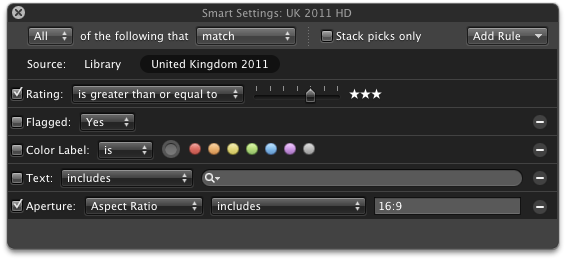
The aspect ratio is an available choice with the "Aperture Metadata" rule. I suppose I could leave the Rating turned off, and use the rating filtering in iMovie as well.
I used a similar method for picking those few photos I still actually print (old school, I know), by setting the filter to "Aspect Ratio...includes...2". This is so both 3:2 and 2:3 ratios are picked up - I haven't found a logical OR equivalent in the Aperture filters.
